 how-to
How Long for Lunch Pickup: A Guide to Fast Takeout
Table of Contents
- Understanding Realistic Lunch Pickup Timeframes
- Factors Affecting Food Preparation Time
- Average Restaurant Takeout Wait Time: What to Expect
- Best Practices for Mobile Order Pickup
- The Golden Window: Timing Your Lunch Pickup for Peak Freshness
- Strategic Ordering for Office Workers
- Managing Pickup Delays and Unexpected Wait Times
- Conclusion
Last Updated: August 12, 2026
Understanding Realistic Lunch Pickup Timeframes
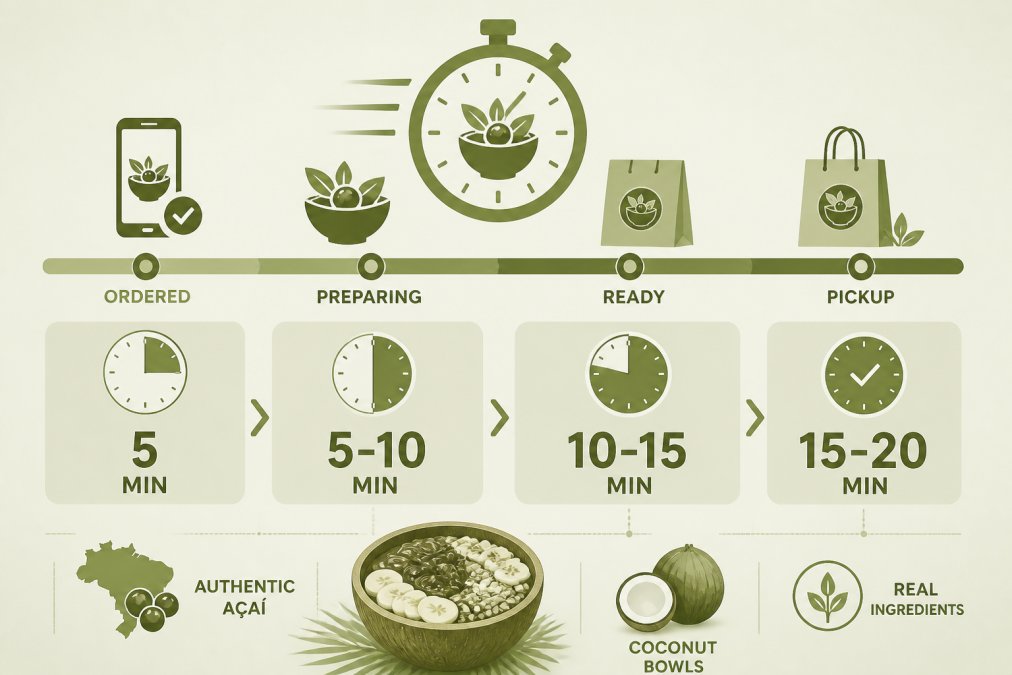
How long for lunch pickup depends on several factors, but understanding what to expect helps you plan your break effectively. When you order ahead through a mobile app or online platform, you're typically looking at 10-20 minutes from order placement to pickup. Walk-in orders during peak lunch hours (noon to 1 p.m.) can take 20-40 minutes, while off-peak times might see 5-15 minute waits.
The reality is that how long for lunch pickup varies dramatically based on restaurant complexity, order volume, and preparation methods. A simple bowl place like World Green Açai, which specializes in a focused menu of organic açai bowls, can prepare orders faster than full-service restaurants juggling dozens of menu items. This matters if you've got 15 minutes and nothing more.
What most people underestimate is the difference between "order ready" and "order in your hands." Even after food is prepared, there's a handoff process, payment verification if you haven't prepaid, and the physical retrieval of your order. Add 2-3 minutes to whatever the restaurant quotes you.
Factors Affecting Food Preparation Time
Restaurant kitchen operations vary wildly, and understanding what slows things down helps you choose when to order. The primary factors are menu complexity, order volume, ingredient prep, and equipment availability.
A specialized restaurant with a narrow menu, like an açai bowl shop, has a significant speed advantage. When the kitchen does one thing exceptionally well, prep time drops. The staff knows exactly where every ingredient sits, how long each component takes, and can work with practiced efficiency. Compare this to a full-service restaurant where cooks juggle appetizers, mains, sides, and desserts simultaneously.
Order volume creates a compounding effect. A single order might take 8 minutes during a quiet afternoon. That same order during a lunch rush might take 25 minutes because the kitchen is already at capacity. They're not slower, they're just processing more orders sequentially. Peak hours (11:30 a.m. to 1:30 p.m.) see exponential wait time increases, especially on weekdays.
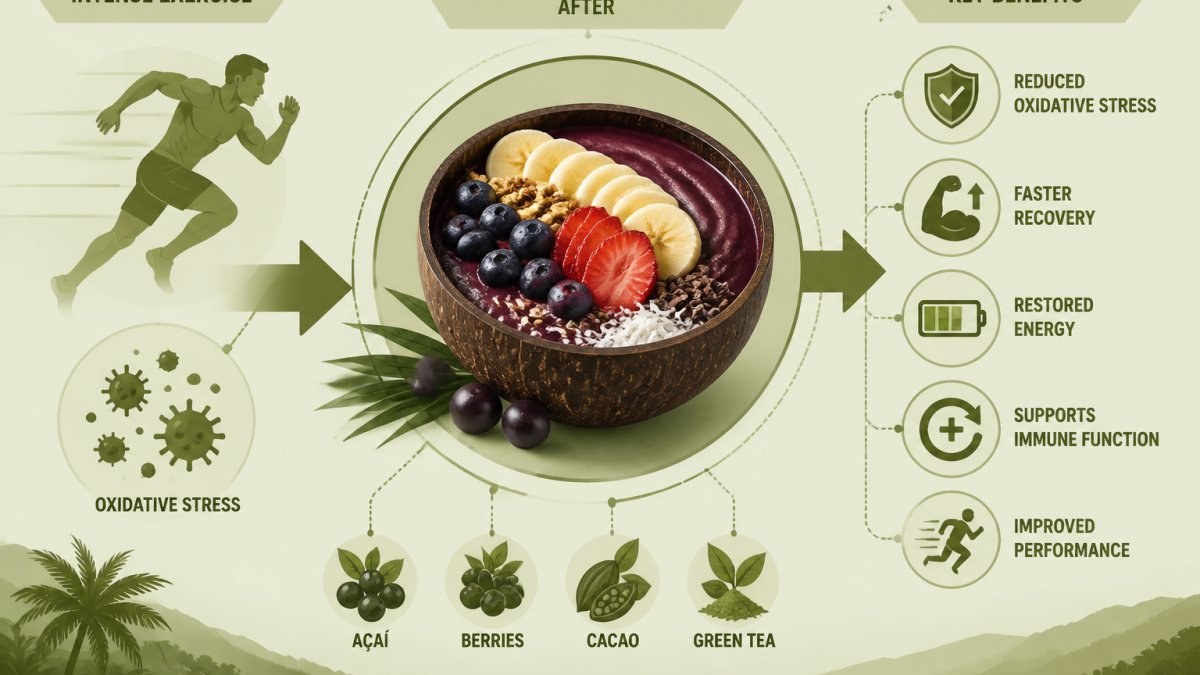
Ingredient preparation matters more than most customers realize. If a restaurant preps ingredients in batches each morning, they can assemble orders quickly. If they prep to order, you're waiting for cutting, blending, or cooking from scratch. Fresh açai bowls, for instance, require blending the açai base, arranging toppings, and sometimes adding fresh fruit, all done per order, which is why quality establishments take slightly longer than fast-food chains.
Equipment bottlenecks are real. If a restaurant has one blender and 15 açai orders queued up, each person waits for their turn. Multiple blenders or parallel workstations dramatically reduce this constraint.
Average Restaurant Takeout Wait Time: What to Expect
Understanding average restaurant takeout wait times gives you realistic expectations for planning your lunch break. For pre-ordered pickups, expect 10-20 minutes from confirmation to ready status. For walk-in orders at a casual restaurant, 15-30 minutes is typical during peak lunch hours.
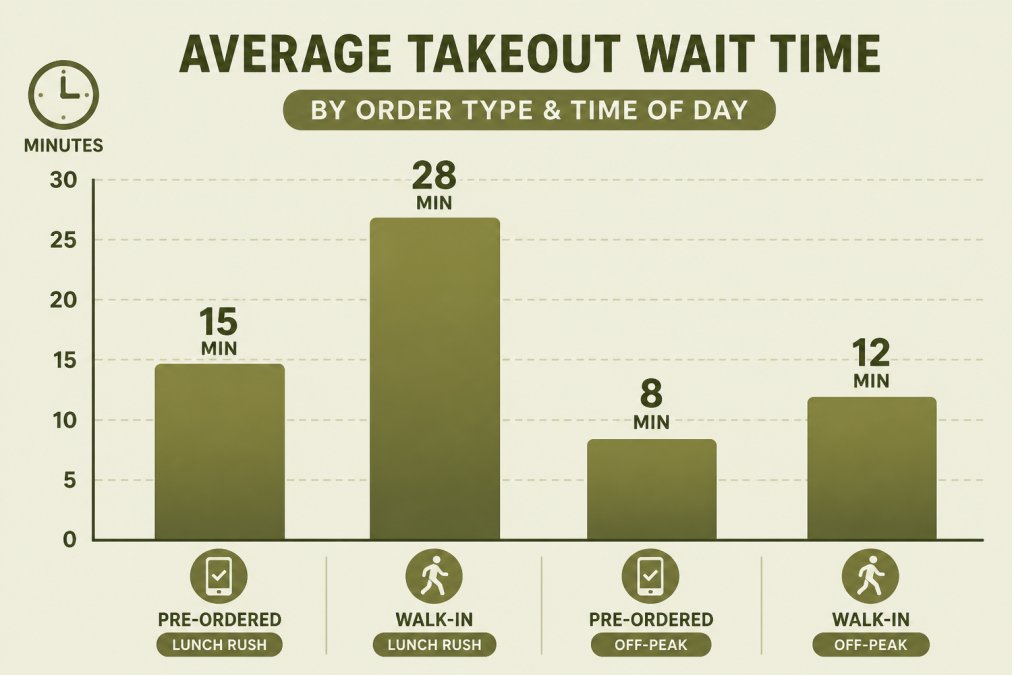
The variation is significant. A quick-service restaurant with simplified operations might deliver orders in 8-12 minutes even during lunch rush. A more complex kitchen with made-to-order components could stretch to 35-45 minutes. Your best practices for mobile order pickup should account for this range.
What matters most is whether you've pre-ordered. Mobile ordering and online ordering systems give restaurants a lead time, they know your order is coming and can prepare components in advance. Walk-in orders require the kitchen to start from zero the moment you order, which adds 5-15 minutes to total turnaround time.
The handoff itself typically takes 2-3 minutes. This includes payment processing if you haven't prepaid, order verification (making sure they're giving you the right order), bagging or boxing, and the physical exchange. Many restaurants now use order-ready notifications sent to your phone, which reduces the "waiting at the counter" component but doesn't eliminate it.
Peak hours amplify everything. Lunch rush creates a queuing effect. Even if each order only takes 12 minutes to prepare, if 30 orders are in the queue ahead of you, you're looking at a longer wait than the prep time alone suggests. Off-peak ordering, before 11:30 a.m. or after 1:30 p.m., cuts your average wait time in half.
Best Practices for Mobile Order Pickup
Mobile ordering has transformed lunch logistics, but using it effectively requires strategy. The best practices for mobile order pickup start with timing and preparation.
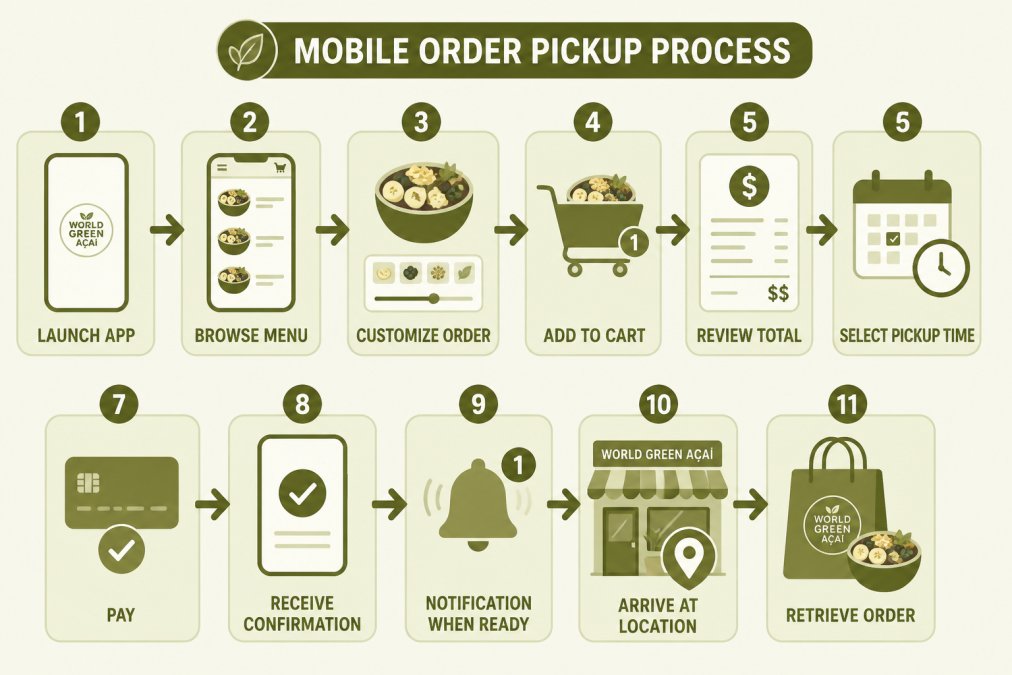
Order during off-peak windows when possible. If your schedule allows, placing your order at 11 a.m. for 11:20 a.m. pickup or at 1:45 p.m. for 2 p.m. pickup avoids the lunch rush crunch. Many restaurants have slower periods mid-afternoon that offer faster turnaround. Check the app, some platforms show estimated wait times based on current order volume.
Customize your order thoughtfully. Adding special requests or modifications extends prep time. A basic order might take 10 minutes; the same order with three custom modifications could take 15-18 minutes. This isn't laziness, it's the kitchen having to deviate from standard assembly. Keep modifications minimal if you're time-constrained.
Use scheduled ordering features when available. Instead of ordering and hoping it's ready in 15 minutes, schedule your order for a specific pickup time. This gives the restaurant a confirmed deadline and lets them batch-prepare your order with others scheduled for the same window. You're less likely to arrive and find your order not started.
Pay through the app before you arrive. Mobile payment integration eliminates the payment step at pickup, cutting your in-person time to just order retrieval. This alone saves 2-3 minutes, which matters when your lunch break is tight.
Arrive within the estimated window, not before. If the app says your order will be ready at 12:15 p.m., arriving at 12:10 p.m. just means standing at the counter waiting. Arriving at 12:15 p.m. or 12:18 p.m. means your order is ready or nearly ready. This seems obvious but many people arrive early, creating bottlenecks at the pickup counter.
The Golden Window: Timing Your Lunch Pickup for Peak Freshness
Beyond speed, there's an optimal timing window for food quality that most people overlook. This is the golden window, the 5-15 minute period after your order is completed when the food is at peak freshness and temperature.
Fresh açai bowls illustrate this perfectly. The açai base is blended to order, creating a thick, creamy texture. If it sits for more than 20 minutes, it begins to separate and oxidize. The fruit toppings stay crisp for about 15 minutes before they start releasing moisture and softening. The granola or coconut flakes maintain crunch for roughly 10-12 minutes before absorbing moisture from the bowl.
Timing your pickup to land in this golden window requires coordinating your order placement with your actual arrival. If you order at 12:00 p.m. and the estimated ready time is 12:12 p.m., aim to arrive at 12:12-12:15 p.m. You get the food at peak quality. Arriving at 12:25 p.m. means you're eating food that's been sitting for 13 minutes, still good, but noticeably less fresh.
This is where mobile apps with real-time notifications shine. You get an alert when your order is ready, allowing you to time your arrival precisely. Without this notification, you're guessing, and guessing wrong often means waiting unnecessarily or arriving too late.
The golden window varies by food type. Hot foods deteriorate faster, a burger or sandwich is best within 10 minutes. Cold items like salads or açai bowls hold quality for 15-20 minutes. Fried foods peak within 5-8 minutes. Understanding what you're ordering helps you set realistic expectations for when to arrive.
Strategic ordering for office workers means placing your order 12-15 minutes before your actual lunch break, giving the kitchen time to prepare while accounting for the golden window. You arrive, retrieve your food, and eat it while it's at its best quality.
Strategic Ordering for Office Workers
Office workers face unique constraints: limited break time, distance from restaurants, and unpredictable meeting schedules. Strategic ordering for office workers means working backward from your available time.
Start by calculating your actual available time. If you have a 30-minute lunch break and your office is 5 minutes from the restaurant, you really have 20 minutes for eating. Subtract 5 minutes for walking/parking and another 2 minutes for payment/retrieval, and you've got 13 minutes to actually eat. This math changes how long for lunch pickup should be acceptable.
For this scenario, you need a restaurant that can deliver your order in 8-10 minutes maximum. This is where specialized quick-service restaurants become invaluable. A place like World Green Açai, which focuses exclusively on high-quality açai bowls, can hit these timelines consistently. You order ahead using the mobile app, arrive at the specified time, and walk out with food you can eat at your desk.
Batch your ordering on low-stress days. If you know Tuesday and Thursday are hectic, prepare by ordering Monday or Wednesday when you have more time. Some restaurants and apps allow advance scheduling, order your Friday lunch on Wednesday afternoon and have it ready at your preferred time.
Build relationships with nearby restaurants that understand your schedule. Regular customers often get priority treatment or faster service. The staff learns your usual order and can start preparing it before you even arrive.
Choose restaurants strategically based on location and speed. A place that's 2 minutes away but takes 25 minutes to prepare is worse than a place that's 5 minutes away but delivers in 10 minutes. Calculate total time, not just distance.
Managing Pickup Delays and Unexpected Wait Times
Despite perfect planning, delays happen. A kitchen falls behind, an order gets lost in the shuffle, or a surprise rush hits. Managing pickup delays requires knowing what to expect and how to respond.
First, understand why delays occur. The most common causes are kitchen understaffing during peak hours, unexpected order complexity, equipment failures, and miscommunication between front-of-house and kitchen. None of these are usually the restaurant's fault, they're system constraints. Knowing this helps you respond calmly rather than assuming negligence.
When you arrive and your order isn't ready, ask for an updated time estimate. A simple "How much longer?" tells you whether you're looking at 2 more minutes or 10. If it's longer than you can wait, ask if you can leave and return, or if they can prioritize your order.
Use the wait time productively. Check email, return messages, or read something. A 10-minute delay feels shorter when you're engaged in something else. Some restaurants have seating areas; if yours does, sit down rather than standing at the counter.
For frequent delays at a specific restaurant, order earlier or choose a different establishment. If a place consistently runs 15-20 minutes behind their quoted time, factor that into your ordering. Or find a faster alternative. Your lunch break is too valuable to waste on consistently slow service.
If a delay means you'll miss your deadline, communicate this to the restaurant. Many will prioritize your order if they understand you're time-constrained. A simple "I have to be back at my office in 5 minutes" often prompts faster service.
Consider backup options. If your primary lunch spot has a history of delays, identify a second restaurant you can pivot to if needed. This might be a food truck, a different café, or even a quick convenience store option. Having a backup plan reduces stress when your first choice falls through.
The reality is that some delays are unavoidable. Building in a 5-10 minute buffer into your lunch timeline accounts for this. If you have 30 minutes available, plan for a 15-minute pickup window rather than cutting it to 10 minutes. This buffer is your insurance against unexpected delays.
Managing your lunch pickup timing is about understanding realistic expectations, choosing restaurants strategically, and building in buffers for the inevitable delays. The best approach combines mobile ordering for speed, off-peak timing when possible, and honest assessment of your available time.
World Green Açai's mobile app integration and focused menu make it an excellent choice for office workers and busy professionals seeking fast, high-quality lunch options. With advance ordering capabilities, you can reliably fit a nutritious meal into even tight lunch windows. Order through the app at World Green Açai's ordering platform to skip the lines and eat at peak freshness.
Frequently Asked Questions
What is the average time for a lunch pickup order?
Most lunch pickup orders take 15-25 minutes from order placement to ready-for-pickup, depending on complexity and kitchen volume. Walk-in orders without advance notice typically take 20-35 minutes. Pre-ordering through a mobile app cuts this significantly, often to 10-15 minutes, because the kitchen begins prep as soon as your order is confirmed. Peak lunch hours (11:30 AM-1:00 PM) can add 5-10 minutes to these estimates.
How do factors affecting food preparation time impact my wait?
Several factors determine how quickly your order is ready: ingredient complexity, kitchen capacity, current order volume, and item freshness standards. Simple items like smoothie bowls prepare faster than multi-component dishes. During lunch rush, even fast items face queue delays. High-quality establishments that prioritize fresh, organic ingredients may take slightly longer to ensure quality consistency, but the result is better food safety and taste.
Does ordering ahead through a mobile app actually save time?
Yes. Mobile order pickup bypasses the in-store line and alerts the kitchen to begin prep immediately. Most restaurants start preparing mobile orders the moment confirmation is received, not when you arrive. This can reduce your total time from order to pickup by 40-50% compared to walk-in orders. Using the app also lets you track your order status in real-time and receive notifications when it's ready.
What should I do if my pickup order is delayed?
First, check your order status through the app or by calling, delays happen due to unexpected volume or ingredient issues. If significantly delayed, ask about a time estimate. For recurring delays at the same location, consider ordering earlier or at off-peak times (before 11:30 AM or after 1:30 PM). If quality is compromised due to wait time, speak with staff about freshness concerns; reputable establishments will remake items if they've been sitting too long.
This article was written using GrandRanker