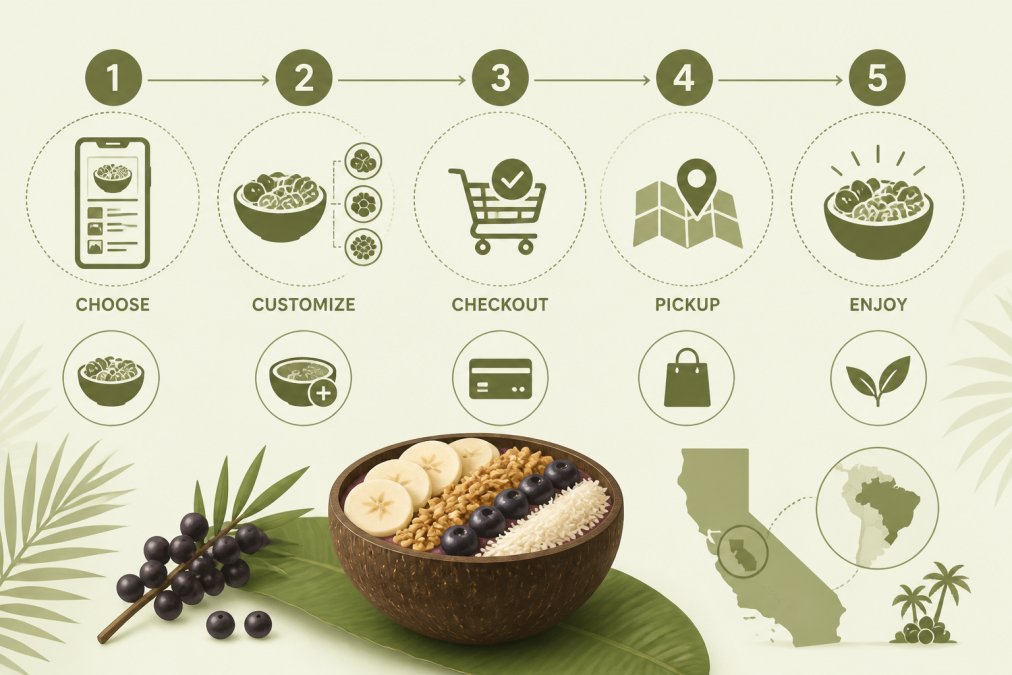
 how-to
How to Order Lunch Online: A Step-by-Step Guide
Table of Contents
- Why Order Lunch Online
- Step 1: Choose Your Restaurant and Platform
- Step 2: Create Your Account and Profile
- Step 3: Browse the Menu and Navigate Categories
- How to Customize Food Orders Online
- Step 5: Select Delivery or Pickup and Complete Payment
- Quick Lunch Pickup Tips for Busy Professionals
- Finding the Best Organic Açai in Marin
Last Updated: August 24, 2026
Why Order Lunch Online
Ordering lunch online has transformed how busy professionals, health-conscious residents, and outdoor enthusiasts access quick, nutritious meals. Beyond speed, online ordering gives you control: you decide exactly what goes into your meal, see prices upfront, and time your pickup or delivery to fit your day. No surprises at checkout, no miscommunications with staff, no settling for what's left in the case.
World Green Açai has built its reputation on this principle: providing high-quality, organic açai bowls through seamless online ordering so you can skip the lines and get straight to enjoying a nutrient-dense meal. Below, we'll walk you through every step of how to order lunch online, from selecting your restaurant to customizing your meal to tracking your delivery or pickup in real-time.
Step 1: Choose Your Restaurant and Platform
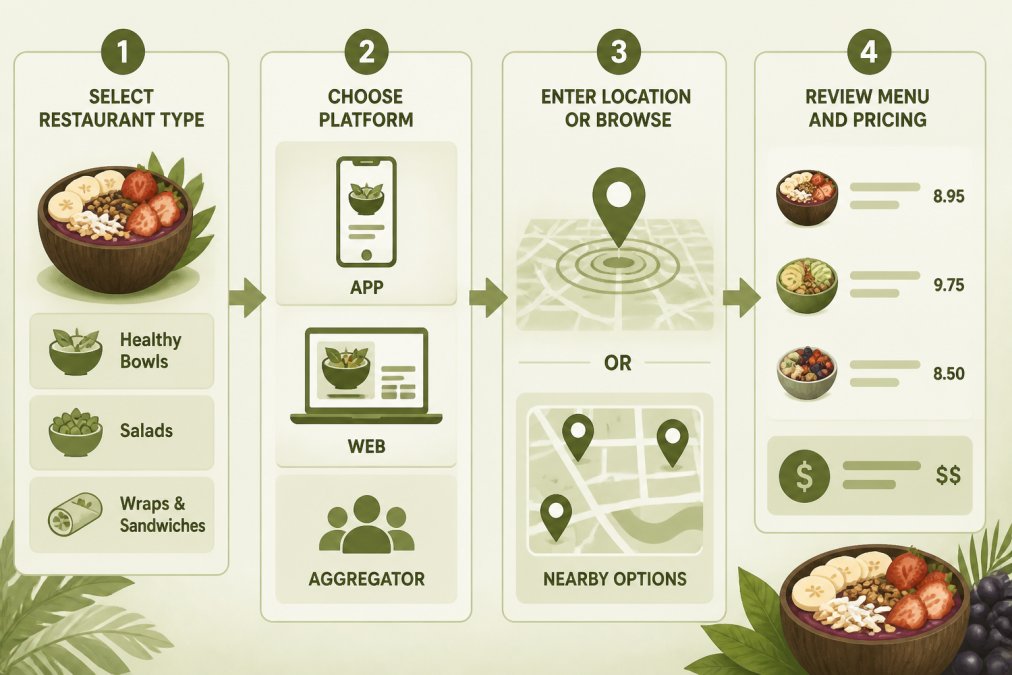
Start by identifying restaurants or specialty food vendors in your area that offer online ordering. Search directly on Google Maps or Apple Maps for "restaurants near me" or "lunch delivery," browse dedicated ordering platforms, or visit a restaurant's website directly. For specialty items like organic açai bowls, searching by cuisine type or ingredient often surfaces the best options faster.
Once you've identified a few places, check whether they have their own mobile app or website for ordering, or if they operate through third-party platforms. This matters because:
- Direct ordering through a restaurant's app or website often has lower service charges and gives you the most customization options
- Third-party platforms offer convenience of browsing multiple restaurants in one place, but typically charge higher fees
- Mobile apps often provide loyalty programs and faster checkout than web browsers
For busy professionals seeking authentic, high-quality açai, World Green Açai offers direct ordering through its mobile app and website, eliminating middleman fees and ensuring you're getting the exact product the restaurant intends to serve.
Check the restaurant's delivery radius if you need delivery, or confirm pickup hours if you're planning to grab your order yourself.
Step 2: Create Your Account and Profile
Most online ordering systems require you to create an account before placing an order. When you create your account, you'll typically provide:
- Email address and password (or login via Google, Apple, or social media)
- Your name and phone number
- Delivery or billing address
- Payment method (credit card, digital wallet, or other secure payment options)
The phone number is especially important. Restaurants and delivery drivers use it to confirm your order, notify you of delays, or reach you if they can't find your location.
Your profile becomes a time-saver on repeat orders. Most platforms save your favorite meals, dietary preferences, and delivery addresses so you don't re-enter everything each time. Take a moment to review the privacy and data security practices of the platform you're using. Reputable ordering systems encrypt your payment information and don't store full credit card details on their servers.
Step 3: Browse the Menu and Navigate Categories
Once you're logged in, you're ready to explore the menu. Most menus are organized by category: bowls, drinks, add-ons, sides, or dietary preferences. Use these categories to narrow your options.
Pay attention to menu descriptions. They often tell you what's included, whether ingredients are organic or locally sourced, and whether a dish is suitable for specific diets (vegan, gluten-free, dairy-free). For specialty items like organic açai bowls, descriptions should indicate the base ingredient quality and sourcing.
Look for visual cues: photos of finished dishes help you understand portion size and presentation. Many platforms highlight popular items or staff recommendations with badges or stars. Some menus include pricing transparency details upfront, which tends to result in fewer customer service complaints.
How to Customize Food Orders Online
Customization is where online ordering becomes powerful. You can specify exactly what you want without hoping the staff interprets your request correctly.
Most platforms organize customization options into clear categories: protein swaps, add-ons, portion adjustments, dietary modifications, and special instructions.
Protein and base swaps: Select your swap from the dropdown. Some swaps cost extra; the system usually shows the upcharge immediately.
Add-ons and extras: Want more granola? Extra fruit? A protein boost? Most platforms let you add items individually. You'll see the price impact before you commit.
Portion sizes: Choose based on your appetite and whether you're ordering just for yourself or sharing.
Dietary restrictions and allergies: If you have a gluten allergy, dairy sensitivity, or dietary preference, select those options clearly. Many platforms flag these to ensure the kitchen sees them. Don't rely on special instructions alone for allergies.
Special instructions: Use the text box for specific requests: "extra light on the honey," "dressing on the side," "no nuts due to allergy." Be specific and concise.
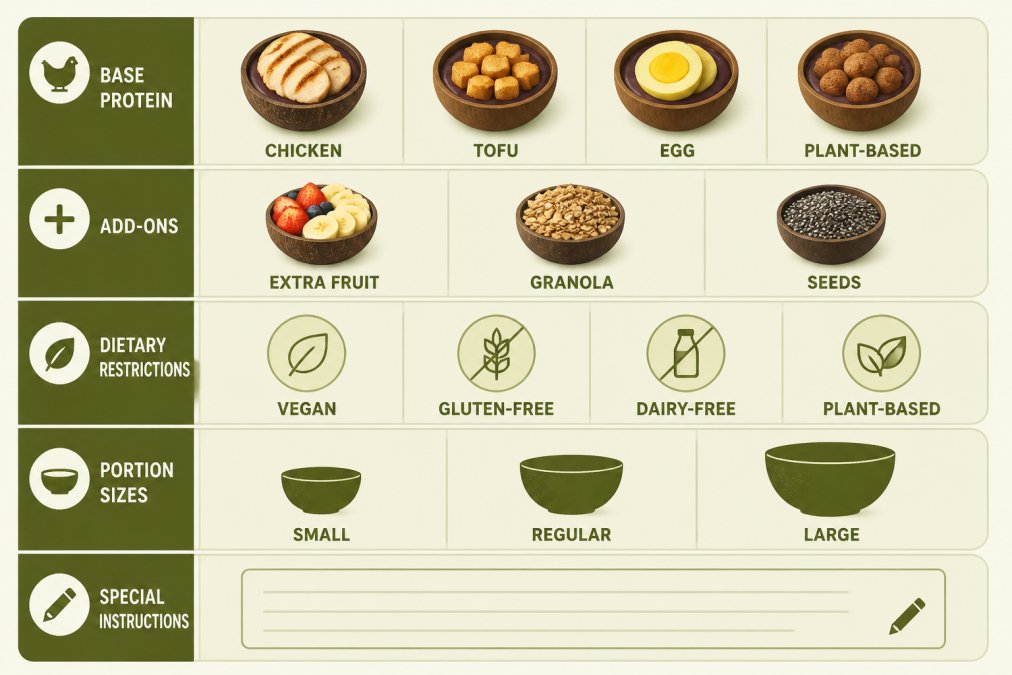
For specialty items like organic açai bowls, customization often includes choosing your base fruit, selecting toppings from a list of fresh ingredients, and deciding on portion size. World Green Açai's online ordering system displays exactly what customization options are available, so you can build your ideal bowl without guessing.
Review your customizations before moving to checkout. Most platforms show a summary of what you've selected. If something looks wrong, edit it now.
Step 5: Select Delivery or Pickup and Complete Payment
Now you're at the final stage: choosing how you want to receive your order and paying for it.
Pickup vs. delivery: Select which option works for your schedule. Pickup is faster (usually 15-30 minutes) and has no delivery fees, but you have to leave your current location (nist.gov). Delivery is convenient if you're at work or home, but it takes longer (typically 30-60 minutes) and includes a delivery fee plus service charge.
If you're choosing pickup, confirm the restaurant's hours and any pickup-specific instructions. If you're choosing delivery, enter your delivery address and confirm it's within the restaurant's service radius.
Payment methods: Secure payment options typically include credit or debit card, digital wallets (Apple Pay, Google Pay), or bank transfers. Choose whichever method you trust and use regularly.
Before you submit payment, review the order summary one final time. Confirm your items and customizations are correct, pickup time or delivery address is accurate, any promotional codes have been applied, and the total price matches your expectation.
Once you've reviewed everything, submit your payment. You should receive an immediate order confirmation via email or in the app, along with an order number and estimated pickup or delivery time.
Quick Lunch Pickup Tips for Busy Professionals
If you're grabbing lunch between meetings or during a tight work window, pickup is your fastest option.
Time your order strategically: Don't order at peak lunch hours (12:00-1:00 PM) unless you have flexibility. Order 15-20 minutes before you want to pick up, or order ahead the night before if the restaurant allows advance orders.
Confirm pickup details before you leave: Check the app or your confirmation email for specific instructions. Some restaurants have a separate entrance for pickup; others bring your order to the counter.
Have your order number or phone number ready: When you arrive, the staff will ask for either your order number or the phone number on the account.
Inspect your order before you leave: Open the bag briefly and confirm it matches your order. Check that customizations are correct.
Use the app's tracking feature: Many platforms send push notifications when your order is being prepared and when it's ready for pickup. This lets you time your arrival perfectly.
For organic açai bowls from World Green Açai, pickup typically takes 10-15 minutes once you've placed your order. The restaurant's mobile app notifies you when your bowl is ready, so you can plan your break accordingly.
Finding the Best Organic Açai in Marin
If you're specifically seeking authentic, high-quality organic açai, the online ordering landscape offers a significant advantage: you can research the source and ingredients before you buy.
When evaluating where to order your açai bowl, look for these markers of quality:
Ingredient sourcing: Authentic açai comes from Northern Brazil and has a specific taste profile, earthy, slightly tart, with natural berry notes (peer-reviewed research). Authentic açai is expensive, so vendors using real açai typically highlight this fact. If a menu doesn't mention where the açai comes from, it's likely a lower-grade product.
Organic certification: Certified organic açai meets specific agricultural standards and is verified by third-party auditors (usda.gov). Reputable vendors display certification information on their website or in the app.
Coconut bowl presentation: High-end açai vendors serve bowls in actual coconut shells rather than standard bowls. This is both traditional and a practical indicator that the vendor is committed to authenticity and sustainability.
Menu transparency: Quality-focused açai shops describe their bowls in detail: what fruits are included, what toppings are available, whether granola is homemade. This level of detail signals expertise and care.
Customer reviews: Online reviews often mention ingredient quality, portion size, and whether the bowl tastes like "real açai." Patterns in reviews are more reliable than any single opinion.
World Green Açai stands out because it uses coconut bowls and real açaí from Northern Brazil. This commitment to ingredient quality and traditional preparation is visible through the online ordering interface and confirmed by the transparency in menu descriptions. For busy professionals, health-conscious residents, and outdoor enthusiasts in Marin seeking genuine organic açai, ordering online from World Green Açai eliminates the guesswork and ensures you're getting the real product.
Ordering lunch online transforms a rushed errand into a deliberate choice. You control what you eat, when you eat it, and how much you spend. Whether you're fueling up between meetings, seeking authentic organic ingredients, or grabbing a post-workout recovery snack, the process is straightforward once you understand the steps.
World Green Açai makes this process even simpler with direct online ordering through its mobile app, transparent menu descriptions highlighting organic açai sourcing and quality ingredients, and reliable pickup that fits your schedule. Order online today and skip the lines, your lunch is ready when you are.
=== FAQ ANSWERS (audit these too, same rules) ===
[1] Q: What is the easiest way to order lunch online? A: The easiest way is to use a restaurant's mobile app or website, create an account, browse the menu by category, and add items to your cart. Most platforms save your preferences and payment method, so repeat orders take just a few clicks. For busy professionals, setting up a saved address and default payment method cuts ordering time to under two minutes.
[2] Q: How do I customize my lunch order through an app? A: When you select a menu item, tap 'Customize' or 'Special Instructions' to modify proteins, add toppings, remove ingredients, or specify dietary needs. Most apps let you add notes at checkout (for example, 'extra thick' or 'light on sweetness'). Review your customizations before confirming payment to ensure the kitchen receives your exact preferences.
[3] Q: How can I find the best organic lunch options nearby? A: Search for restaurants that emphasize organic or health-focused menus in your area. Read menu descriptions for sourcing details, certifications, or ingredient transparency. Check customer reviews for feedback on ingredient quality and freshness. Many restaurants display certifications or sourcing information directly on their app or website to help you verify authenticity.
[4] Q: What should I do if my online lunch order arrives late or incorrect? A: Contact the restaurant or platform's customer support immediately through the app or website. Most platforms offer order tracking so you can see real-time status updates. If there's a significant delay, you can often cancel or request a refund. Take a photo of any incorrect items as proof. Reputable services will resolve the issue quickly, often offering a credit toward your next order.
Frequently Asked Questions
What is the easiest way to order lunch online?
The easiest way is to use a restaurant's mobile app or website, create an account, browse the menu by category, and add items to your cart. Most platforms save your preferences and payment method, so repeat orders take just a few clicks. For busy professionals, setting up a saved address and default payment method cuts ordering time to under two minutes.
How do I customize my lunch order through an app?
When you select a menu item, tap 'Customize' or 'Special Instructions' to modify proteins, add toppings, remove ingredients, or specify dietary needs. Most apps let you add notes at checkout (for example, 'extra thick' or 'light on sweetness'). Review your customizations before confirming payment to ensure the kitchen receives your exact preferences.
How can I find the best organic lunch options nearby?
Search for restaurants that emphasize organic or health-focused menus in your area. Read menu descriptions for sourcing details, certifications, or ingredient transparency. Check customer reviews for feedback on ingredient quality and freshness. Many restaurants display certifications or sourcing information directly on their app or website to help you verify authenticity.
What should I do if my online lunch order arrives late or incorrect?
Contact the restaurant or platform's customer support immediately through the app or website. Most platforms offer order tracking so you can see real-time status updates. If there's a significant delay, you can often cancel or request a refund. Take a photo of any incorrect items as proof. Reputable services will resolve the issue quickly, often offering a credit toward your next order.
This article was written using GrandRanker